
Website Log In Procedure
How Do I Log in to the LeadingAge
Nebraska Website?
Whether you’re new to LeadingAge Nebraska or a long-time member, navigating our new system can take a little getting used to. If you’ve experienced challenges logging in, accessing your membership information, viewing registered events, or updating your details—you’re not alone!
To help, we’ve put together a few simple steps to guide you through the log in process. Prefer a visual walkthrough? We’ve also recorded a helpful video. And as always, if you have questions or need additional support, feel free to reach out to Natalie by emailing at natalie.mccormick@leadingagene.org or calling her cell at 402-327-9252—we’re here to help!

Let us walk you through the log in procedure
Click the video to view the log in procedure
If you prefer a quick video that shows the procedure, click the video in this section. For step-by-step written instructions, keep scrolling!
If you have logged in before ...
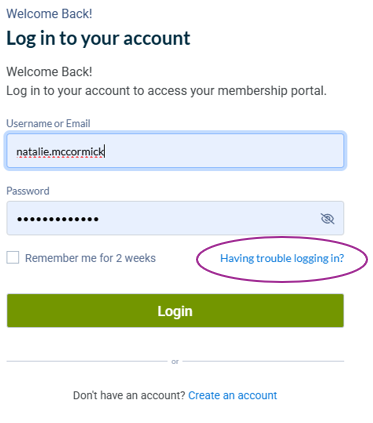
Click Member Login at the top of the website (this should be viewable from any page on the desktop version). If you do not remember your password, click "Having trouble logging in?" and enter the email you would have used to set up your account. It may take a few minutes to receive the password reset email and please check spam or junk folders if you do not receive it within 15 minutes.
If you have never logged in ...
Click the Member Login button at the top of the website (this should be viewable from any page on the desktop version). Click “Create an account” at the bottom of the page.
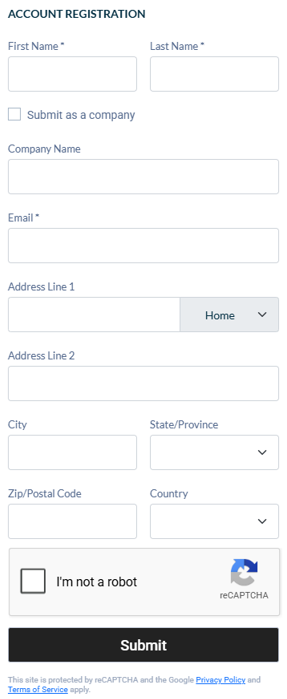
To create your account, the ACCOUNT REGISTRATION screen will appear. Complete the information, check "I'm not a robot" and click Submit. Only check "Submit as a company" near the top if you are setting up the initial account for your organization.
Once you click Submit, the system will send you an email. It may take a few minutes to receive the email (it will come from LeadingAge Nebraska) and please check spam or junk folders if you do not receive it within 15 minutes. Click the first link in that email and you will be directed to select a username and password.
IMPORTANT: When setting your username, we strongly suggest that you use first.last format INSTEAD of email. This way if you change organizations or positions, your CEs and other information will still be linked to YOU and not your email address.
Once you are logged in ...
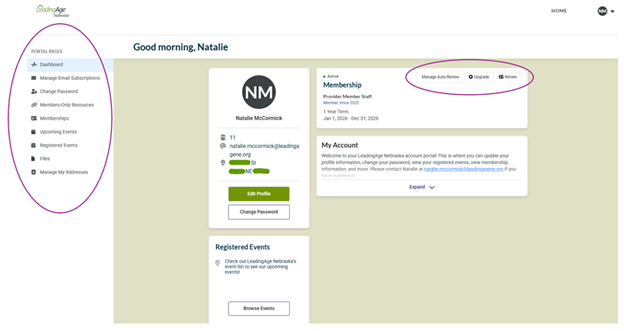
Initially you will be taken to your profile page. It will have information such as your name, contact information, membership information, a way to edit your profile information, change your password, renew your membership, and more. There is a white menu on the left side that can direct you to events for which you are registered.
Click "Registered Events" on the left menu to view events for which you are registered and to pay outstanding invoices.
If you still have trouble logging in or finding what you need, the LeadingAge Nebraska Team is always available.